
Lightning Web Components
Enrich Lead
Add the Enrich Lead component to enrich Lead records with Proff company data.
Required Fields for Enrich Lead
The Enrich Lead action requires the following fields to be populated on the Lead record:
- Org Number / Company ID OR Company Name
- Country Code
Adding the Enrich Lead Component to the Lead Lightning Page
To enable lead enrichment using the Proff Connect application, you need to access and edit the Lead Lightning Page in Salesforce.
Accessing the Lead Lightning Page
You can access the Lead Lightning Page in two different ways:
Alternative 1: From a Lead Record
- Navigate to the Lead object and open any lead record.
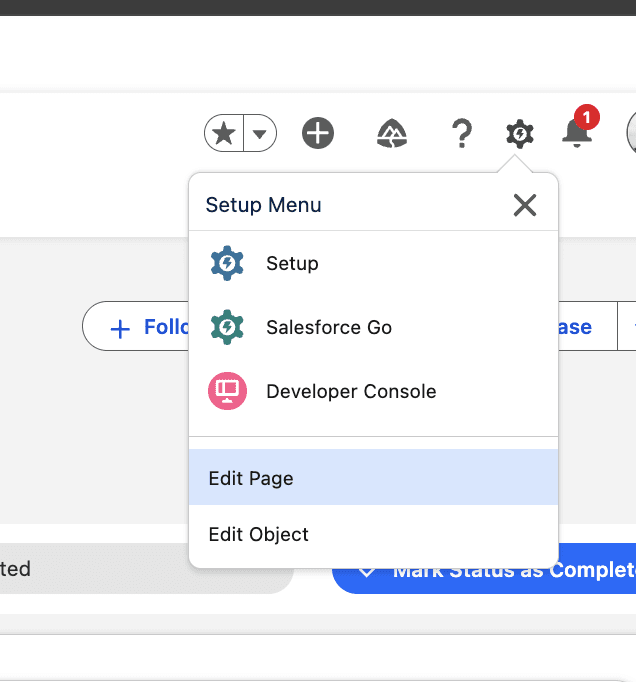
- In the top-right corner, click the Setup (⚙️) icon.
- Select Edit Page from the dropdown menu.
Alternative 2: Through Object Manager
- Go to Setup → Object Manager → Lead.
- In the sidebar, click Lightning Record Pages.
- Select the Lightning Page where you want to add the Enrich Lead component.
- Click Edit to open the Lightning App Builder.
Adding the Enrich Lead Component
Once you are in the Lightning App Builder, you can edit the Lead Lightning Page layout:
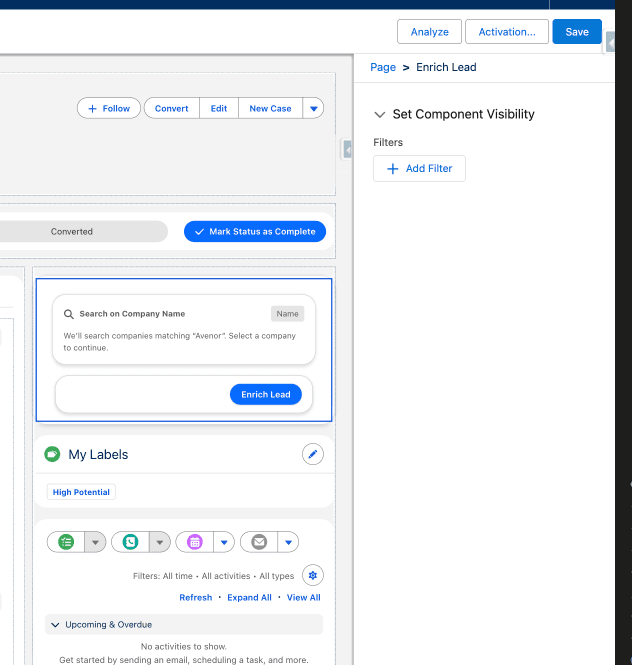
- In the Components panel (on the left), locate Enrich Lead under Custom – Managed.
- Drag and drop the Enrich Lead LWC onto the page where you want it to appear.
Was this article helpful?